Menu Element

Menus are objects that can be used in different contexts. The menu creation process is standardized. <br>

The four different ways you can use menus are: <br>

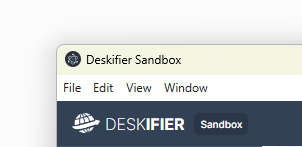
Menubars (Windows & Linux) attach to the top of windows. This means each individual window can have it's own menubar.

Menubars only work on windows with window frames.

<div align="left" data-with-frame="true"><figure><img src="https://909455594-files.gitbook.io/~/files/v0/b/gitbook-x-prod.appspot.com/o/spaces%2FC8kwY8yODXmNxAtaN0Ej%2Fuploads%2FMyKVakMLBD3MbUqt5ZJ5%2Fimage.png?alt=media&token=5164474b-a213-4aeb-bb18-8e1f1eba26a4" alt=""><figcaption></figcaption></figure></div> Titlebars (macOS) attach to the top of the screen, and is the same menu for each window.
It's recommended to always have a titlebar on macOS with basic functionality enabled like copy & paste. Otherwise, hotkeys such as Cmd + C won't work in your app.

<div align="left" data-with-frame="true"><figure><img src="https://909455594-files.gitbook.io/~/files/v0/b/gitbook-x-prod.appspot.com/o/spaces%2FC8kwY8yODXmNxAtaN0Ej%2Fuploads%2FIEkkU4XKW2yNseEVT611%2Fimage.png?alt=media&token=a6c30440-26c7-4192-a220-182c48c00517" alt=""><figcaption></figcaption></figure></div>


Context Menu

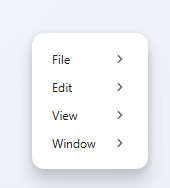
Context menus appear when the user right clicks in your app. The context menu can be set to change depending on what kind of element the user clicks on. <div align="left" data-with-frame="true"><figure><img src="https://909455594-files.gitbook.io/~/files/v0/b/gitbook-x-prod.appspot.com/o/spaces%2FC8kwY8yODXmNxAtaN0Ej%2Fuploads%2F9PNGzWgSRR7xKU6ooQ0v%2Fimage.png?alt=media&token=d83f87cd-8e80-4834-9514-8ee26e3d2e08" alt=""><figcaption></figcaption></figure></div>

Tray menu<br>

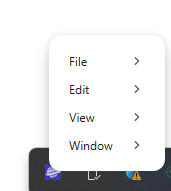
If you add a tray widget, you can add a menu that shows up when the user right clicks it. <div align="left" data-with-frame="true"><figure><img src="https://909455594-files.gitbook.io/~/files/v0/b/gitbook-x-prod.appspot.com/o/spaces%2FC8kwY8yODXmNxAtaN0Ej%2Fuploads%2FcpejqAxy7EokfQn63n54%2Fimage.png?alt=media&token=955a254d-ce1d-44db-b9cd-0740f7f7cc06" alt=""><figcaption></figcaption></figure></div>
<div align="left" data-with-frame="true"><figure><img src="https://909455594-files.gitbook.io/~/files/v0/b/gitbook-x-prod.appspot.com/o/spaces%2FC8kwY8yODXmNxAtaN0Ej%2Fuploads%2Fb75m1uA0yp1A76YFcVEw%2Fimage.png?alt=media&token=adc4142f-d69b-4ac5-a4fe-c421b6b1323c" alt=""><figcaption></figcaption></figure></div>
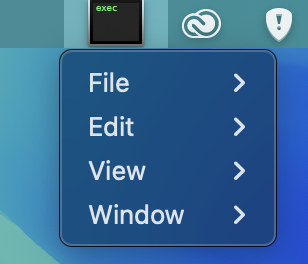
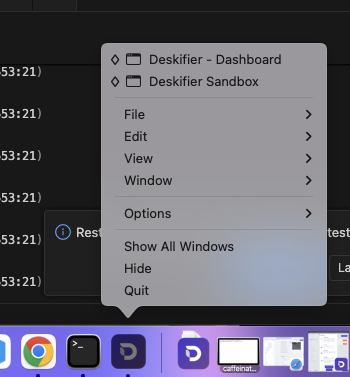
Dock menu (macOS only)<br>

Customize which options show up when the user right clicks your dock menu. <div align="left" data-with-frame="true"><figure><img src="https://909455594-files.gitbook.io/~/files/v0/b/gitbook-x-prod.appspot.com/o/spaces%2FC8kwY8yODXmNxAtaN0Ej%2Fuploads%2F0VQsl3DrNgLmBmZAsm14%2Fimage%20(8).png?alt=media&token=12a9ec0f-f327-47e7-8ff0-e37fe65eb40b" alt=""><figcaption></figcaption></figure></div>
actions

events

states