Hiding the window while loading
When the window opens immediately, users will briefly see a blank page while your app loads.
This flash provides no useful information and can make your app feel slower or less polished.
By hiding the window until your app is ready, you can eliminate the white flash and present your UI instantly.
This process is simple & highly recommended.
Before:

<figure><img src="https://909455594-files.gitbook.io/~/files/v0/b/gitbook-x-prod.appspot.com/o/spaces%2FC8kwY8yODXmNxAtaN0Ej%2Fuploads%2Fp35C97ENgbSpY77lgkrL%2FwhiteLoadingScreen.gif?alt=media&token=95bcc514-0383-4d62-b76b-98a7f78cb098" alt=""><figcaption></figcaption></figure>
After:
<figure><img src="https://909455594-files.gitbook.io/~/files/v0/b/gitbook-x-prod.appspot.com/o/spaces%2FC8kwY8yODXmNxAtaN0Ej%2Fuploads%2FM9kgMFFfxP1oh99JB11S%2FnoLoadingScreen.gif?alt=media&token=d2d1ad8e-e394-4b36-bb65-c0ef4bffe806" alt=""><figcaption></figcaption></figure>
Even if the actual load time is the same, eliminating the white screen significantly improves how fast and polished your app feels.
How To:
- When creating your window via the Window - Create Window action, set "Show On Creation" to "no" & "Show After Loading" to "yes"
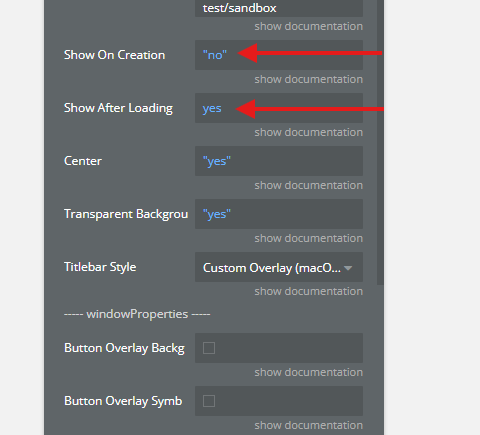
<figure><img src="https://909455594-files.gitbook.io/~/files/v0/b/gitbook-x-prod.appspot.com/o/spaces%2FC8kwY8yODXmNxAtaN0Ej%2Fuploads%2Fh37I28CrmcyWg6L6C0tB%2Fimage.png?alt=media&token=d4c2148c-fdff-4b72-b79e-0d39e753f0b8" alt=""><figcaption></figcaption></figure>