Checking if the current page is a desktop app, and checking current platform
You may want to conditionally show certain UI or run certain actions based on the platform or build type.
To determine the device OS, we can use states on the System Element.
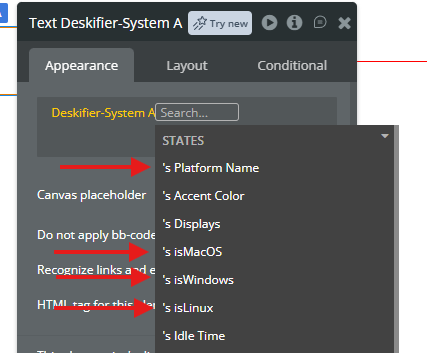
<figure><img src="https://909455594-files.gitbook.io/~/files/v0/b/gitbook-x-prod.appspot.com/o/spaces%2FC8kwY8yODXmNxAtaN0Ej%2Fuploads%2Fl18d1zZaNYWG7gVovd6A%2Fimage.png?alt=media&token=f97a5c6b-c376-4778-bf5a-56a44cc7de05" alt=""><figcaption></figcaption></figure>
To determine if the app is currently running as a desktop app, we can check this field on the App Element.
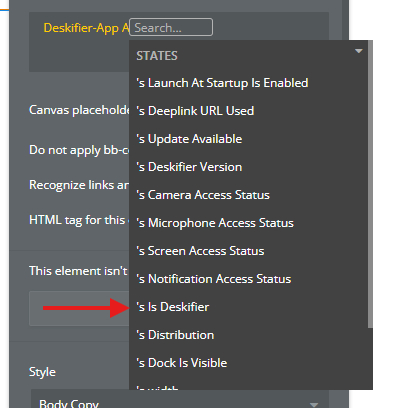
<figure><img src="https://909455594-files.gitbook.io/~/files/v0/b/gitbook-x-prod.appspot.com/o/spaces%2FC8kwY8yODXmNxAtaN0Ej%2Fuploads%2FYuIB1F3E44ASgpkDFOlY%2Fimage.png?alt=media&token=39db59b8-32aa-4b3a-95a8-ffa946e7292c" alt=""><figcaption></figcaption></figure>
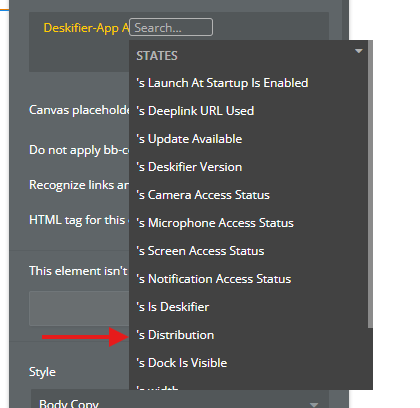
And additionally, we can check which distributable type the app is currently running in with this field
<figure><img src="https://909455594-files.gitbook.io/~/files/v0/b/gitbook-x-prod.appspot.com/o/spaces%2FC8kwY8yODXmNxAtaN0Ej%2Fuploads%2FZ7acOia67PEvx7dm8A1Y%2Fimage.png?alt=media&token=57b2961a-648d-4db6-9214-21eec45ff839" alt=""><figcaption></figcaption></figure>
The possible values are MAS (Mac App Store), DMG (Mac Installer), APPX (Windows App Store), NSIS (Windows Installer), APPIMAGE (Linux)